
- How Salesforce Actually Stores Files (And Why It Matters)
- Salesforce File Storage Limits: The Problem Most Teams Discover Too Late
- Why Native Salesforce File Management Breaks at Scale
- External Storage Is Inevitable (But Most Orgs Do It Wrong)
- Salesforce + Google Drive / OneDrive — What Integration Really Means
- Record-Centric File Architecture — The Missing Layer
- Automating File Operations with Salesforce Flow
- Governance, Security, and Compliance Considerations
- Designing a Scalable Salesforce File Strategy (Our Framework)
- How Leading Salesforce Orgs Apply This in the Real World
- Section 12: Enabling Record-Centric File Architecture in Salesforce
- Salesforce File Management in 2026
Salesforce File Management in 2026
Salesforce file management has quietly become one of the most underestimated scaling risks inside modern Salesforce orgs.
In the early days, files feel manageable. A few proposals attached to Opportunities. Some onboarding documents linked to Accounts. The occasional contract uploaded to a Case. Everything works. Until it doesn’t.
Based on what we’ve seen across growing Salesforce implementations, file-related issues don’t surface gradually. They compound. Storage limits are hit unexpectedly. Duplicate files appear across records. Ownership becomes unclear. Sharing rules start breaking business workflows. Admins spend more time explaining where files live than improving the system itself.
This is not a user problem. And it’s not a training problem.
Salesforce is functioning exactly as designed.
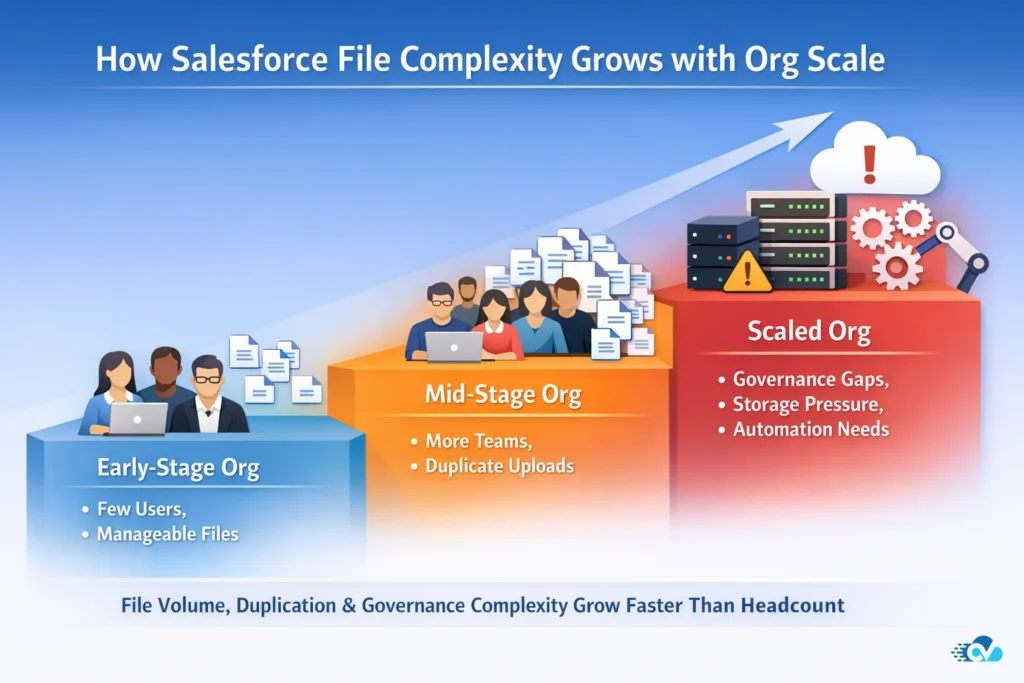
Salesforce is a system of record, optimized for managing data, relationships, and business processes. File support exists to provide context and collaboration around those records—not to act as a full-scale document management system with lifecycle control, archival rules, or storage optimization.
Challenges emerge when document-heavy behaviors are layered onto a record-centric platform without architectural guardrails. The issue is not that Salesforce cannot store files, but that file behavior is often left unmanaged as orgs scale.
What makes this challenge harder is that most teams respond reactively. They discover Salesforce file storage limits after costs rise. They add Google Drive or OneDrive integrations without rethinking structure. They automate uploads but not organization. The result is a fragmented document ecosystem that feels connected on the surface but fragile underneath.
In this guide, we’re not going to repeat basic “how to upload files” advice. Instead, we’ll walk through how Salesforce file management actually behaves at scale, why common approaches fail, and how leading teams are rethinking file storage, automation, and governance as part of their core Salesforce architecture.
If you’re responsible for keeping your Salesforce org scalable, compliant, and cost-efficient, file management is no longer a side concern. It’s foundational.
How Salesforce Actually Stores Files (And Why It Matters)
To understand why Salesforce file management breaks down at scale, you first need to understand how Salesforce actually stores files behind the scenes. This is where most misconceptions begin.
From the outside, Salesforce makes file handling feel simple. You upload a document, attach it to a record, and move on. But internally, Salesforce files are not treated as “folders and documents” in the way Google Drive or OneDrive works. They are treated as records with metadata, references, and sharing layers layered on top.
That design choice is powerful for collaboration, but problematic for storage-heavy use cases.
Salesforce Files Are Metadata-First, Not Storage-First
When a file is uploaded to Salesforce, it isn’t just stored as a binary object. Salesforce creates and manages multiple related records, including versions, links, and access references. Each file can be associated with multiple records at once, which is great for visibility, but it also introduces complexity.
In real-world Salesforce orgs we’ve worked with, this leads to a few consistent outcomes:
- The same file appears across multiple records, but is not always clearly owned by any one record
- Users struggle to understand where the “source of truth” lives
- Admins lose visibility into which files actually consume storage versus which are just references
At small scale, this complexity is invisible. At larger scale, it becomes a governance nightmare.
Why Attachments and Salesforce Files Don’t Scale the Same Way
Older Salesforce orgs still rely heavily on legacy Attachments, while newer orgs default to Salesforce Files. Both have limitations, just in different ways.
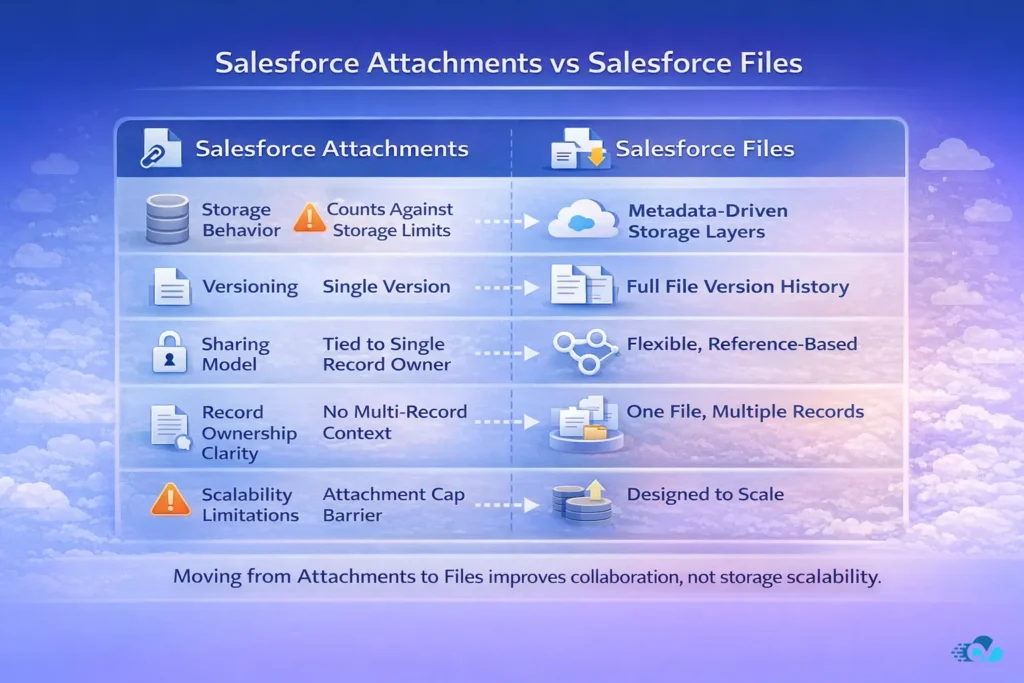
What we’ve consistently observed is that teams assume moving from Attachments to Files automatically solves storage and organization problems. In practice, it only shifts the problem.
Salesforce Files improve sharing and collaboration, but they do not solve:
- Long-term storage efficiency
- Folder-based organization
- Automated lifecycle management
- Predictable file ownership
In fact, Salesforce intentionally abstracts away folders. Files are meant to float across records, users, and libraries. That abstraction works well for collaboration, but it works against teams that need structure, auditability, and scale.
The Hidden Cost of Record-Agnostic Files
One of the most common pain points we hear from Salesforce admins is this:
“We can see the files, but we don’t know where they actually belong.”
Because Salesforce Files are not inherently record-centric, the relationship between a file and a business process becomes blurred over time. Files outlive stages. Records close. Users change roles. But the files remain, loosely linked, often duplicated, and rarely cleaned up.
Over multiple years, this creates:
- Bloated file storage usage
- Inconsistent naming conventions
- Manual cleanup efforts that never quite finish
- Increased risk during audits or migrations
This is why file storage issues in Salesforce tend to surface suddenly. The system doesn’t degrade linearly. It reaches a tipping point.
Why This Matters Before We Talk About Storage Limits
Many teams jump straight to discussing Salesforce file storage limits without understanding the underlying model. That’s a mistake.
Salesforce file challenges do not stem from platform limitations. They stem from applying document-management expectations to a record-centric system.
Storage limits are not just about volume. They are about how files are created, linked, duplicated, and retained over time. Without addressing the structural model, increasing storage or adding external integrations only delays the inevitable.
In our experience, the orgs that struggle the most with file storage are not the ones uploading the largest files. They’re the ones without a clear file architecture.
And that’s where most Salesforce implementations fall short.
Salesforce File Storage Limits: The Problem Most Teams Discover Too Late
Salesforce file storage limits rarely feel like an immediate risk. In fact, in most Salesforce orgs we’ve worked with, file storage is almost never discussed during initial implementation or even early scaling phases. It’s treated as something that can be “handled later.”
That assumption is exactly why it becomes a problem.
Salesforce file storage issues don’t announce themselves early. They surface abruptly, usually when an org is already under pressure to scale, onboard new teams, or support higher transaction volumes. By the time storage limits enter the conversation, teams are no longer deciding strategically. They’re reacting.
Why Salesforce File Storage Feels Unlimited—Until It Isn’t
One of the most common misconceptions we see is that Salesforce file storage behaves like traditional file storage systems. In reality, Salesforce does not store files as simple binary objects. Files are stored and governed as records, complete with metadata, versions, links, and sharing references.
As file activity increases, storage consumption grows through record creation, versioning, and duplication—not because files are inherently large, but because file behavior generates additional system records. Without visibility into this behavior, storage usage can accelerate quietly over time.
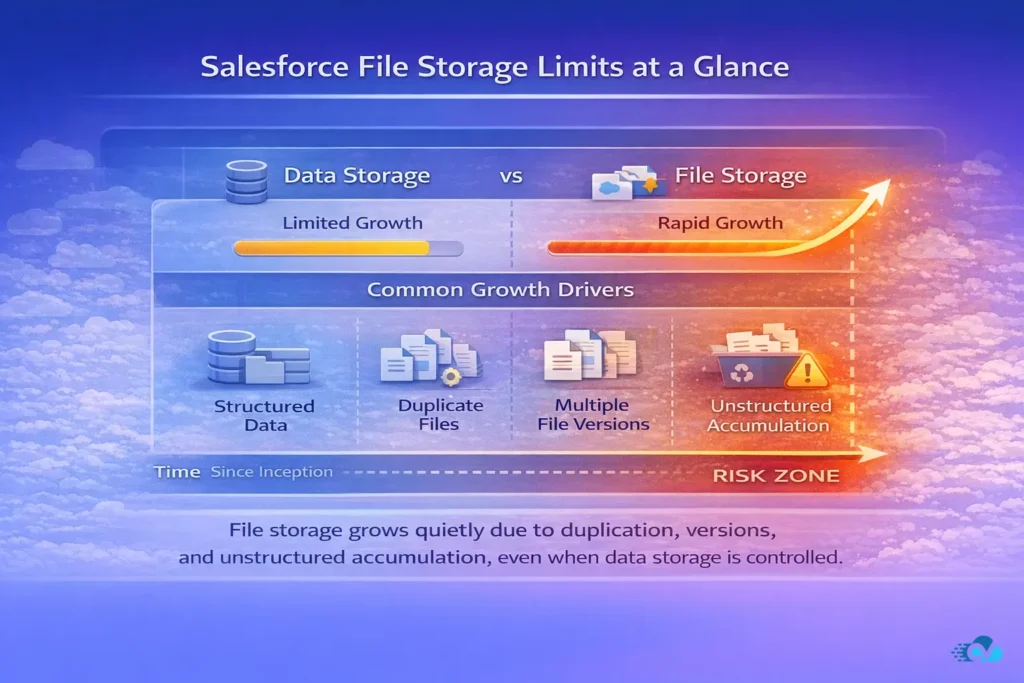
In practical terms, this means:
- Files accumulate even when records are closed or archived
- Multiple versions of the same file count toward storage
- Duplicate uploads across records multiply consumption silently
What makes this worse is that Salesforce does an excellent job of abstracting storage mechanics away from users. Uploading a file feels frictionless. The cost is hidden until it’s not.
Across mid-sized Salesforce orgs, we consistently see file storage becoming a concern not because of a single large upload, but because of years of unstructured accumulation.
File Storage vs Data Storage: A Distinction That Matters
Salesforce clearly separates data storage and file storage, but many teams treat them as interchangeable. They’re not.
Data storage is predictable. Admins track record counts, field usage, and archiving strategies early. File storage, on the other hand, is often left unmanaged because it feels secondary to core CRM data.
File storage behaves differently because files introduce additional records, versions, and sharing relationships that are not always visible at the surface level. While Salesforce clearly separates data storage and file storage, file-related record growth is often less actively governed, which makes long-term consumption harder to predict without intentional design.
- Files are added by many roles, not just system processes
- Files lack standardized lifecycle rules
- File ownership is loosely defined
We’ve seen orgs where data storage was under control, yet file storage limits were reached unexpectedly, forcing rushed decisions that compromised structure and governance.
The Hidden Multipliers That Inflate File Storage
What accelerates Salesforce file storage usage isn’t just file size. It’s behavioral patterns baked into daily operations.
Some of the most common multipliers we encounter include:
- Sales teams attaching the same proposal to multiple Opportunities
- Support teams uploading screenshots and logs repeatedly to Cases
- Operations teams storing reference documents directly on records instead of linking
Each action feels harmless in isolation. At scale, these patterns compound.
The result is a storage curve that doesn’t follow headcount or revenue growth. It follows process sprawl.
Why Storage Costs Become a Strategic Issue
When Salesforce file storage limits are reached, teams are presented with limited options. Increase storage allocation, manually clean up files, or move files externally—often under time pressure.
What we’ve observed is that organizations that hit storage limits without a plan tend to:
- Over-purchase storage as a short-term fix
- Rush into external storage without a clear structure
- Create exceptions that are hard to unwind later
This is where file storage shifts from a technical concern to a strategic cost and governance issue.
Storage decisions made in a rush almost always resurface later as operational friction.
The Real Problem Isn’t the Limit—It’s the Lack of Strategy
Salesforce file storage limits are not inherently unreasonable. They become painful when files are treated as passive attachments instead of active system components.
Teams that plan file management intentionally—defining what belongs in Salesforce, what belongs externally, and what should be automated—rarely hit limits unexpectedly. Teams that don’t eventually do.
And that’s the pattern we see repeatedly.
The lesson here is not “avoid Salesforce files.” It’s understand how they behave before scale forces your hand.
Why Native Salesforce File Management Breaks at Scale
By the time Salesforce file storage limits become visible, most teams already feel something else is wrong. Things are slower. Users complain they can’t find the right document. Admins spend more time explaining where files live than improving workflows.
These are not isolated annoyances. They are system-level failure signals.
From what we’ve consistently observed across growing Salesforce orgs, native file management doesn’t fail because Salesforce “can’t store files.” It fails because the model was never designed to support long-term scale, structure, and automation simultaneously.
The First Breaking Point: No Natural File Ownership
In Salesforce, files are designed to be shared. That sounds ideal. In practice, it creates ambiguity.
As orgs scale, files:
- Outlive records
- Move across stages and processes
- Get reused across departments
But Salesforce doesn’t enforce a clear home for a file. There’s no native concept of “this file belongs to this record and follows its lifecycle.” Over time, this leads to orphaned files, unclear ownership, and cleanup tasks that no one feels responsible for.
At small scale, this is manageable. At enterprise scale, it becomes ungovernable.
The Second Breaking Point: Record-Centric Workflows vs File-Agnostic Storage
Salesforce workflows are deeply record-centric. Everything meaningful happens because a record changes state.
Files, however, do not naturally follow that same logic.
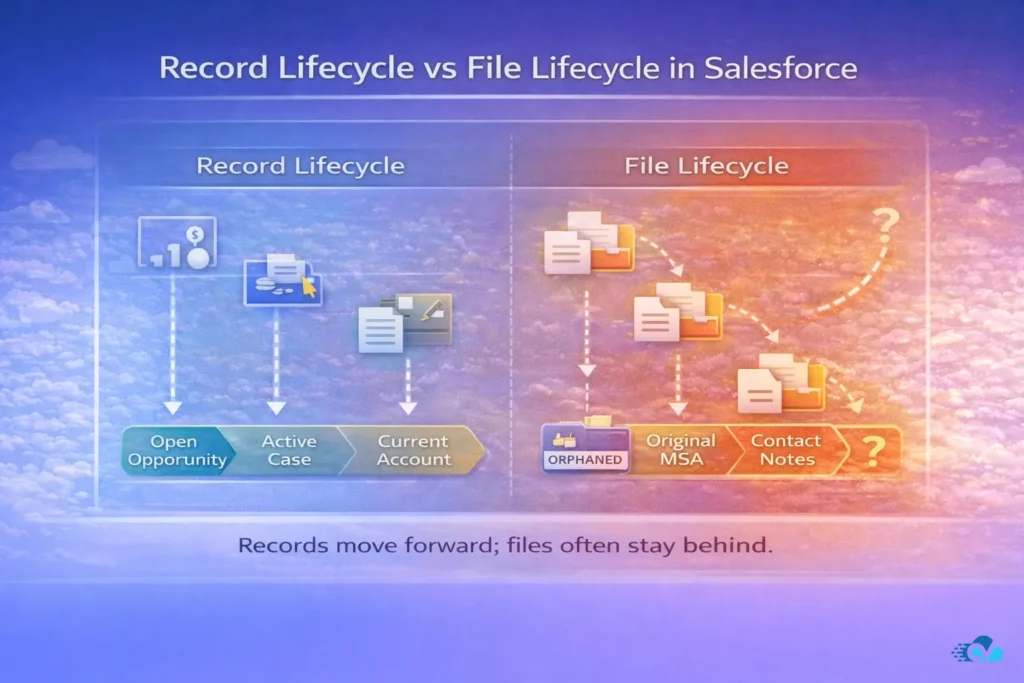
What we repeatedly see is this disconnect:
- A Deal moves to Closed Won, but its files remain scattered
- A Case is resolved, but its attachments stay indefinitely
- A Customer is churned, but their documents still consume storage
Salesforce has no native mechanism to automatically align file lifecycle with record lifecycle. That mismatch grows more painful as automation, reporting, and compliance requirements increase.
The Third Breaking Point: Manual Behavior Becomes the System
When native file handling falls short, teams compensate manually.
They create naming conventions. They add instructions. They train users to “upload files this way.” None of this scales.
In real orgs, what actually happens is:
- Power users create workarounds
- New users don’t follow them
- Admins become enforcement layers
Eventually, the system reflects human inconsistency rather than operational intent. File management becomes dependent on memory instead of logic.
This is usually the moment teams realize they don’t have a file strategy. They have habits.
The Fourth Breaking Point: Automation Stops at the File Layer
Modern Salesforce orgs are automation-heavy. Flows orchestrate everything from lead routing to renewals. But native file handling sits largely outside that automation fabric.
Without external support:
- Files can’t be reliably created, moved, or renamed based on record changes
- Folder structures can’t be enforced automatically
- File operations remain manual exceptions in otherwise automated systems
This is one of the clearest signals that native file management has reached its ceiling. When everything else is automated, but files aren’t, friction becomes unavoidable.
Why These Issues Don’t Appear Immediately
One reason native Salesforce file management breaks silently is that each limitation seems reasonable on its own. It’s only when they intersect that the system bends.
- Shared files + no ownership
- Unlimited uploads + limited lifecycle control
- Record automation + file inertia
Individually, these are tradeoffs. Together, they form a structural bottleneck.
Teams that scale successfully don’t fix these problems one by one. They step back and rethink how files fit into their Salesforce architecture altogether.
External Storage Is Inevitable (But Most Orgs Do It Wrong)
Once teams accept that native Salesforce file management won’t scale indefinitely, the next decision feels obvious: move files out of Salesforce.
In practice, this is where many orgs replace one problem with another.
Based on what we’ve seen across Salesforce implementations at different stages of maturity, external storage itself is not the differentiator. Almost every growing org eventually connects Salesforce to either Google Drive or OneDrive.
What separates stable systems from chaotic ones is how that external storage is introduced into the Salesforce architecture.
The Inevitable Shift Away from Native Storage
There is a point in every scaling Salesforce org where keeping files natively becomes inefficient, expensive, or operationally risky. This usually happens when:
- File volumes grow faster than record volumes
- Compliance or audit requirements demand clearer ownership
- Multiple teams need access to the same documents across records
- Storage costs become visible to leadership
At this stage, external storage stops being a “nice to have” and becomes an architectural necessity.
The mistake many teams make is treating this shift as a purely technical integration, rather than a structural redesign.
The Most Common External Storage Mistake: One Giant Folder
The single most common pattern we see is deceptively simple:
“Let’s just connect Salesforce to Drive and store everything there.”
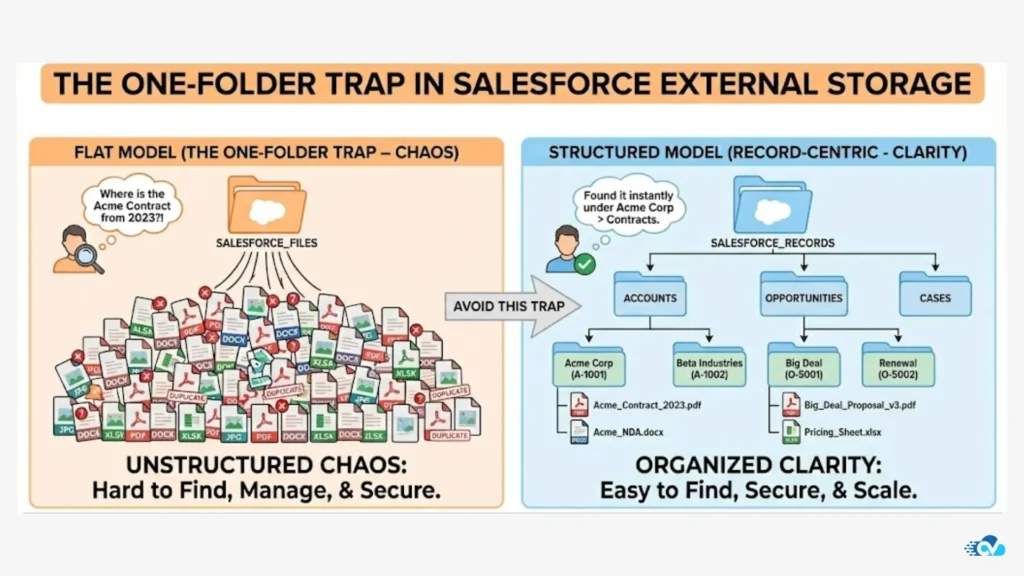
This usually results in:
- A single root folder per org or department
- Subfolders created inconsistently by users
- No enforced relationship between records and folders
At first, this feels like progress. Storage pressure drops. Uploads are faster. But within months, teams start reporting the same complaints they had before, just in a different system.
Files exist, but context is missing.
Why “External” Without Structure Makes Things Worse
External storage systems are excellent at storing files. They are not aware of Salesforce records, lifecycles, or business logic unless you explicitly design for that.
When external storage is bolted on without structure:
- Files lose their connection to Salesforce records
- Folder names drift from record names
- Automation becomes fragile or impossible
- Governance depends on human discipline
We’ve seen orgs where Salesforce storage limits were solved, but audit readiness actually declined because files were no longer reliably traceable to records.
The irony is that external storage often increases flexibility, but without architectural guardrails, it also increases entropy.
Integration vs Architecture: A Critical Distinction
Most marketplace tools advertise “Salesforce + Google Drive integration” or “Salesforce + OneDrive sync.” That language hides an important truth.
Integration answers the question:
Can Salesforce talk to external storage?
Architecture answers the question:
How should files live, move, and age across systems?
Without architecture:
- Sync creates duplication instead of clarity
- Linking becomes inconsistent
- Automation becomes brittle
This is why simply “adding Drive” rarely fixes long-term file chaos.
What Scalable Orgs Do Differently
The orgs we see succeeding with external storage approach it differently. They start by defining rules, not tools.
They answer questions like:
- Which files should live outside Salesforce by default?
- How should folders be created and named?
- When should files move, archive, or be renamed automatically?
- How does file ownership map to record ownership?
Only after these decisions are made does external storage actually reduce complexity.
At that point, it stops being a workaround and becomes part of the system.
Salesforce + Google Drive / OneDrive — What Integration Really Means
By the time teams decide to externalize files, the conversation usually turns to integrations. Connect Salesforce to Google Drive. Or connect Salesforce to OneDrive. Problem solved.
In reality, this is where expectations and outcomes often diverge.
We’ve seen many Salesforce orgs implement integrations successfully from a technical standpoint, yet still struggle operationally. Files are accessible, but not predictable. Storage pressure is reduced, but governance remains unclear. Automation exists, but only at the edges.
The root cause is a misunderstanding of what “integration” actually delivers.
Integration Is Connectivity. Architecture Is Control.
Most integrations do one thing well: they allow Salesforce to communicate with external storage systems like Google Drive and OneDrive.
That connectivity enables:
- Uploading files from Salesforce to external storage
- Linking files or folders back to records
- Viewing documents without leaving Salesforce
All of this is useful. None of it, by itself, guarantees scalability.
What integration does not inherently provide is:
- A consistent folder strategy
- Lifecycle alignment between records and files
- Automated enforcement of structure
- Long-term governance
This distinction matters more as orgs grow.
Sync, Link, and Automate Are Not the Same Thing
One reason integrations underdeliver is that different teams assume different behaviors from the same tool.
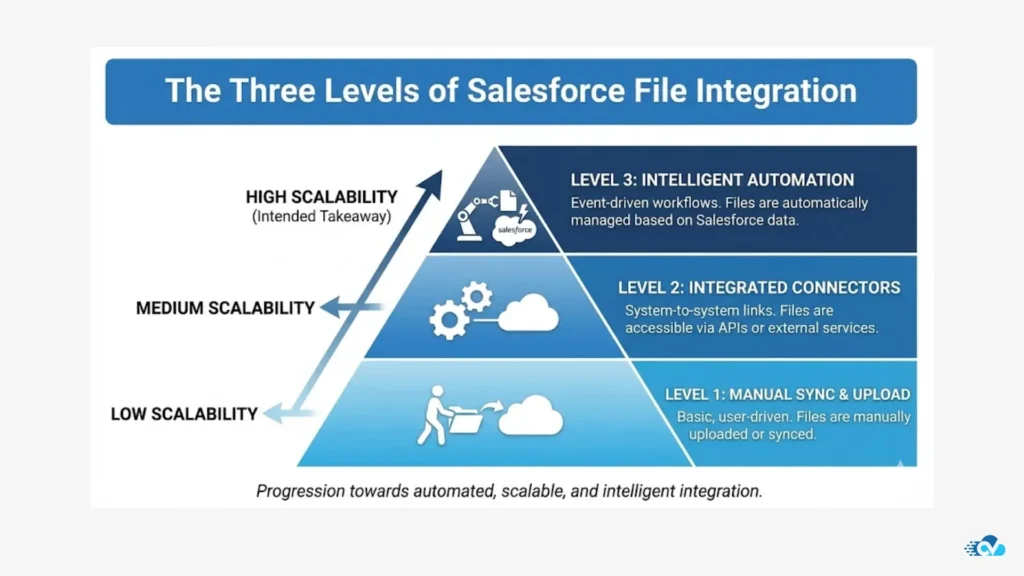
In practice, Salesforce-to-storage integrations fall into three functional patterns:
- Sync: Files are mirrored between systems
- Link: Files live externally but are referenced inside Salesforce
- Automate: File actions respond to record behavior
Most orgs stop at sync or link. The problems begin when they expect automation-level outcomes from sync-level setups.
Sync can reduce duplication. It does not create structure.
Linking improves access. It does not manage lifecycle.
Automation is the layer that turns integration into architecture.
Why Folder Structure Is the Real Battleground
External storage platforms are folder-first by design. Salesforce is not.
This mismatch creates friction unless folder creation and naming are explicitly tied to Salesforce records. Without that alignment:
- Folder names drift from record names
- Multiple folders are created for the same business entity
- Users invent their own structures
Over time, teams end up managing two systems that technically talk to each other, but conceptually disagree.
The orgs that succeed treat folders as extensions of records, not as shared filing cabinets.
Integration Without Automation Creates Fragile Systems
We’ve consistently observed that integrations without automation age poorly.
At first, everything works. Then:
- Records change names, but folders don’t
- Opportunities close, but files remain active
- Accounts merge, but documents stay fragmented
Without automation, admins are left manually correcting what the system should have handled. That’s not a tooling failure. It’s an architectural gap.
Automation is what allows files to:
- Be created when records are created
- Move when stages or ownership changes
- Archive when processes complete
Without it, integration simply postpones complexity.
What “Real” Integration Looks Like in Mature Orgs
In mature Salesforce orgs, integration is invisible. Users don’t think about where files live. They just follow records.
That’s because the system:
- Creates folders automatically
- Names them consistently
- Links them predictably
- Moves or archives them based on business logic
Integration becomes infrastructure. And infrastructure, when done right, fades into the background.
Record-Centric File Architecture — The Missing Layer
At this point, a pattern should be clear.
Salesforce is record-centric.
External storage platforms are folder-centric.
Most file strategies fail because they never reconcile the two.
Across the Salesforce orgs we’ve worked with, the turning point almost always comes when teams stop asking where files should live and start asking what record should own them. That shift changes everything.
Why Records, Not Users, Must Define File Structure
In many Salesforce orgs, file organization is implicitly user-driven. Sales reps upload proposals. Support agents attach screenshots. Operations teams store reference documents wherever it feels convenient at the moment.
This works until:
- Users change roles
- Records move through stages
- Ownership shifts across teams
When files are tied to people instead of records, structure erodes over time. What remains is a collection of documents that technically exist, but lack business context.
A record-centric file architecture flips that model.
Files are no longer “uploaded by someone.”
They are owned by a record.
What Record-Centric Architecture Actually Means
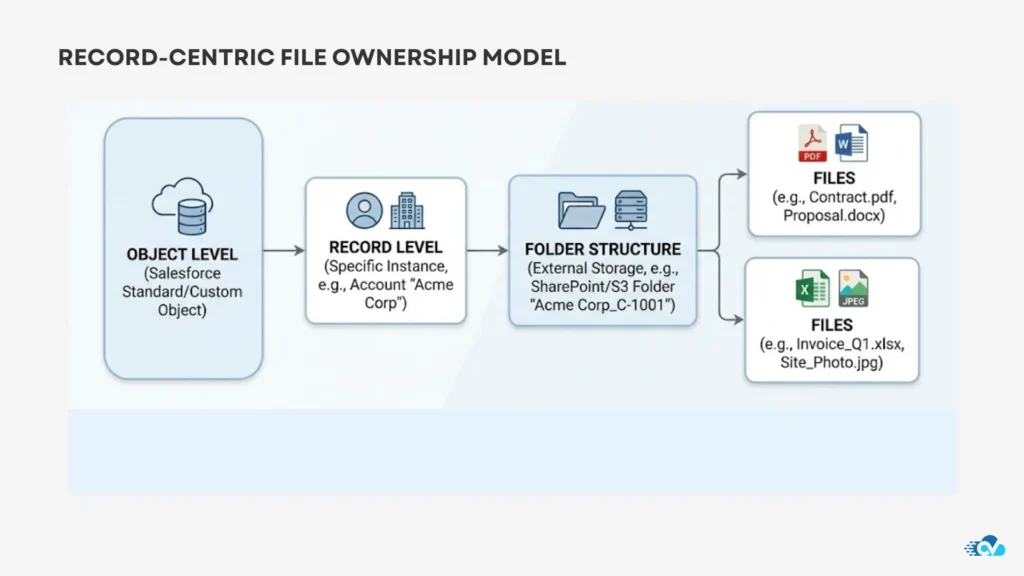
A record-centric approach establishes a predictable hierarchy that mirrors Salesforce’s data model.
In its simplest form, this looks like:
- Object → Record → Folder
- Subfolders that reflect meaningful business stages or categories
For example:
- An Account owns all customer-level documents
- An Opportunity owns deal-specific proposals and contracts
- A Case owns troubleshooting artifacts and logs
Users interact with files through records, but the system enforces structure automatically.
This alignment is critical because it allows files to follow the same lifecycle logic as the data they support.
The Lifecycle Advantage Most Teams Miss
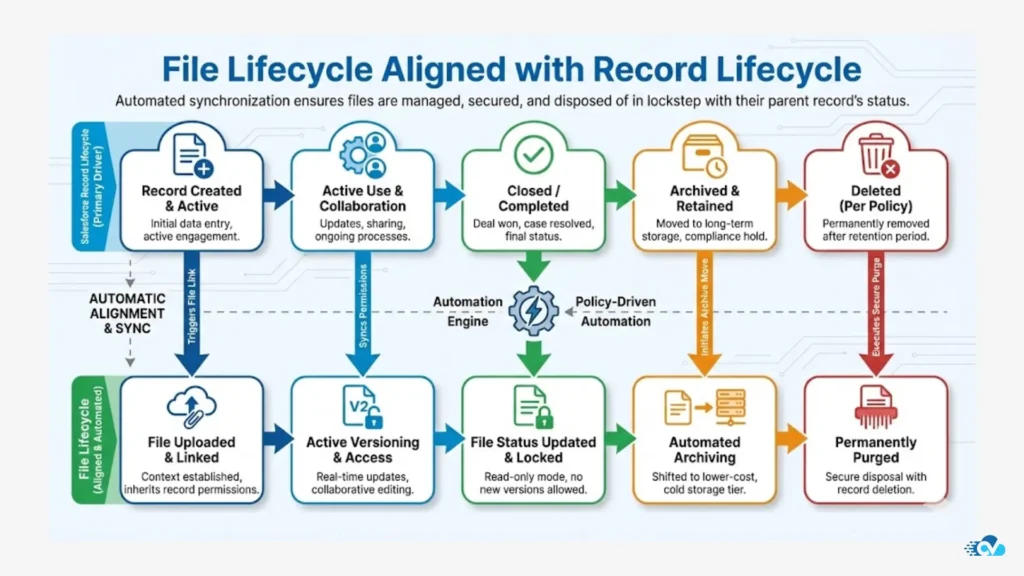
Once files are anchored to records, lifecycle management becomes possible.
In practice, this enables behaviors like:
- Creating folders automatically when records are created
- Renaming folders when record names change
- Moving or archiving files when records close
- Preserving historical context without manual cleanup
Without record-centric architecture, these actions require human intervention. With it, they become deterministic.
This is one of the clearest differences we see between reactive file setups and scalable ones.
Why This Layer Is Missing in Most Implementations
Most Salesforce file strategies jump from integration straight to automation, skipping structure entirely.
That gap shows up later as:
- Multiple folders for the same record
- Files linked but not organized
- Automations that break because folder context is unclear
Record-centric architecture is the stabilizing layer that makes automation reliable and governance enforceable.
It’s also the layer most often overlooked because it doesn’t come “out of the box.”
How Record-Centric Design Reduces Cognitive Load
There’s a human benefit here that often gets overlooked.
When files are organized around records:
- Users stop searching across systems
- Admins stop answering “where is this file?”
- Auditors stop asking for manual reconciliation
The system becomes intuitive because it mirrors how people already think about their work: by customer, deal, case, or project.
That’s not just good design. It’s operational leverage.
Automating File Operations with Salesforce Flow
Once record-centric file architecture is in place, automation stops being fragile and starts becoming reliable. This is where most mature Salesforce orgs see the biggest leap in operational efficiency.
In our experience, teams don’t struggle because they lack automation. They struggle because automation stops at the file layer.
Salesforce Flow is exceptionally good at orchestrating record behavior. Status changes, ownership updates, approvals, renewals—these are all well covered. Files, however, often remain manual exceptions in an otherwise automated system.
That gap is not accidental. Native file handling was never designed to be deeply lifecycle-aware. But when files are treated as extensions of records, Flow becomes a powerful control plane for document operations.
Why Files Must Respond to Record Changes
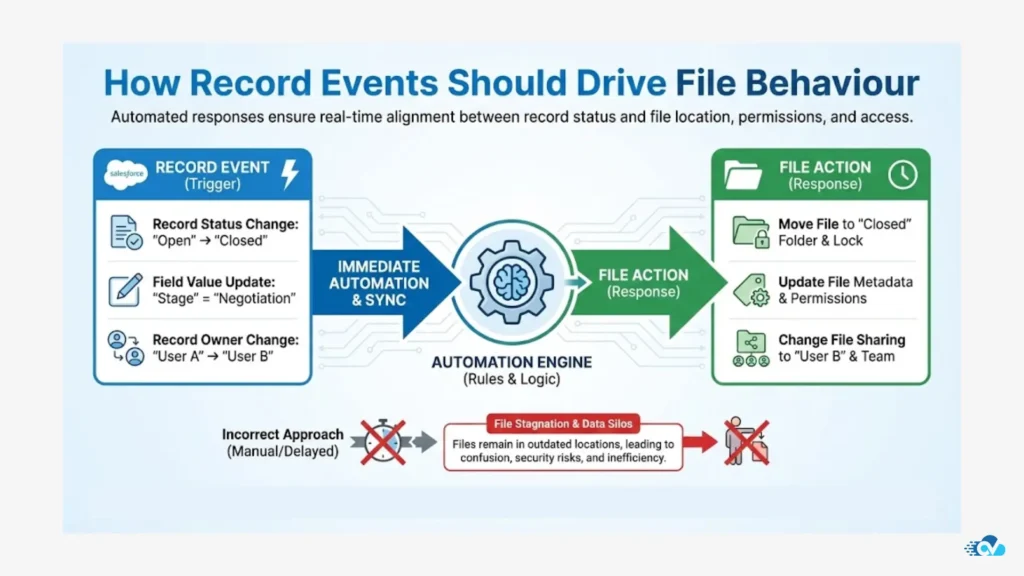
Every meaningful Salesforce process is triggered by a record event:
- An Opportunity moves to Closed Won
- A Case changes status
- An Account is onboarded or offboarded
In scalable orgs, files must respond to those same events. Otherwise, they lag behind reality.
What we’ve consistently seen is that when file behavior is automated alongside record behavior:
- Manual cleanup drops dramatically
- File duplication decreases
- Audit readiness improves
- Admin intervention becomes the exception, not the rule
Automation turns file management from a maintenance task into a background process.
Common File Automation Patterns That Actually Scale
Across multiple Salesforce implementations, a few automation patterns show up repeatedly in orgs that scale cleanly.
These patterns are not complex, but they are foundational.
1. Folder creation on record creation
When a new record is created, a corresponding folder is created automatically using a consistent naming convention. This ensures files have a home from day one.
2. Folder renaming on record updates
When record names change, folders follow automatically. This prevents drift between Salesforce and external storage.
3. File movement based on lifecycle events
When records change stage or status, files are moved to appropriate subfolders or archived locations.
4. Automated uploads tied to business logic
Files added to Salesforce are automatically routed to the correct external folder without user decision-making.
These automations eliminate ambiguity and remove decision fatigue from users.
Why Automation Fails Without Structure
It’s important to call this out clearly: file automation without record-centric structure does not scale.
We’ve seen Flow automations fail because:
- Folder context was unclear
- Multiple folders existed for the same record
- File names were inconsistent
- Ownership rules were undefined
In those cases, admins end up writing exception logic to handle edge cases that shouldn’t exist in the first place.
Structure first. Automation second. Always.
Salesforce Flow as a File Control Plane
When implemented correctly, Salesforce Flow becomes more than a workflow tool. It becomes a file orchestration layer.
Flows can:
- Decide where files should live
- Enforce naming and hierarchy
- Control movement and retention
- Align files with compliance rules
At that point, files stop being passive objects and start behaving like governed system assets.
This is the moment where file management stops feeling like overhead and starts feeling invisible.
What Changes for Admins and Users
The biggest impact of file automation is not technical. It’s experiential.
Admins stop:
- Writing documentation for file handling
- Policing folder usage
- Cleaning up storage manually
Users stop:
- Asking where files should go
- Creating ad-hoc folders
- Re-uploading the same documents
The system simply behaves the way it should.
That’s the signal of a mature Salesforce file strategy.
Governance, Security, and Compliance Considerations
As Salesforce orgs mature, file management stops being just an operational concern and becomes a risk surface. This is where governance, security, and compliance move from abstract policies to everyday system behavior.
In our work across regulated and high-growth environments, we’ve seen a consistent pattern: teams that solve storage and automation but ignore governance eventually circle back to fix it under pressure. Audits, security reviews, customer trust questions, or internal risk assessments force the issue.
The good news is that good file architecture makes governance easier, not harder.
Why Files Are a Governance Blind Spot in Salesforce
Salesforce governance is typically strong around:
- Data access
- Field-level security
- Object permissions
- Audit trails for records
Files often sit outside that rigor.
Because files are:
- Uploaded by many roles
- Shared across records
- Stored externally
They tend to escape the same level of intentional control. Over time, this creates uncertainty around who can access what, why a file still exists, and whether it should be there at all.
This isn’t a tooling failure. It’s an architectural one.
Ownership, Access, and the “Who Can See This?” Question
One of the first governance questions auditors ask is deceptively simple:
Who owns this document, and who can access it?
In native Salesforce file setups, the answer is often unclear. A file may be visible to multiple users, linked to multiple records, and stored without a defined lifecycle.
When external storage like Google Drive or OneDrive is introduced without structure, the problem can actually worsen. Sharing permissions drift. Folder-level access is set manually. Exceptions accumulate.
In contrast, record-centric file architecture creates a clear ownership model:
- Record ownership defines file ownership
- Record sharing rules influence file access
- Lifecycle events control file retention
Governance becomes systemic instead of manual.
Audit Readiness Is About Traceability, Not Storage Location
A common misconception is that keeping files inside Salesforce is inherently safer or more compliant. In practice, auditors care far more about traceability than location.
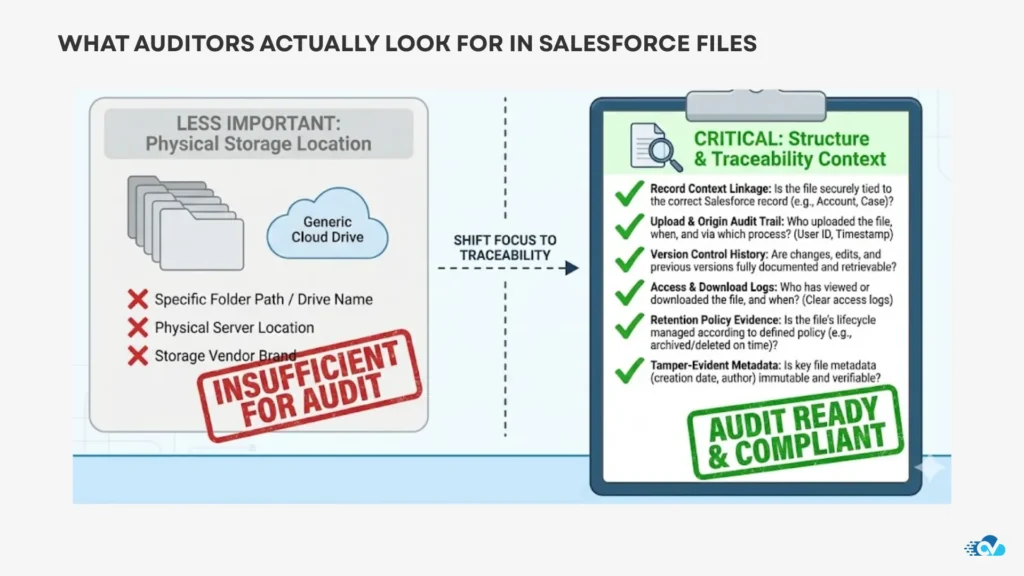
They want to know:
- Why a file exists
- Which business process it supports
- Who accessed it
- When it should be archived or deleted
External storage, when structured and automated, often performs better on these dimensions than unmanaged native storage.
We’ve seen orgs pass audits more smoothly after externalizing files, because folder structures, naming conventions, and access rules were finally explicit.
Retention, Archiving, and the End of “Forever Files”
One of the biggest compliance risks we see is unbounded retention. Files that should have been archived or deleted years ago continue to exist simply because no one owned the decision.
When file lifecycle is tied to record lifecycle:
- Closed deals can trigger archival
- Resolved cases can move to long-term storage
- Inactive customers can have documents locked or removed
This reduces both storage bloat and compliance exposure.
Governance improves not through stricter rules, but through predictable automation.
Security Improves When Humans Are Removed from the Loop
The most secure file systems we see are not the ones with the longest policy documents. They’re the ones with the least manual intervention.
When users no longer decide:
- Where files go
- Who gets access
- When files should move
Security becomes consistent by default.
That’s the difference between policy-driven governance and system-enforced governance.
Designing a Scalable Salesforce File Strategy (Our Framework)
After working with a wide range of Salesforce orgs at different stages of maturity, one thing is clear: teams that scale cleanly don’t “fix files.” They design for them.
What follows is the framework we’ve seen consistently work in real-world Salesforce environments. It’s not theoretical. It’s built from patterns that hold up under growth, compliance pressure, and automation complexity.
We’ll call it the Four-Layer Salesforce File Strategy.
This framework deliberately separates concerns so that storage, structure, automation, and governance don’t fight each other as the org grows.
Layer 1: Decide What Belongs Inside Salesforce vs Outside
The first mistake many teams make is trying to store everything in one place.
A scalable strategy starts by acknowledging that Salesforce is not a document repository. It’s a system of record.
What we’ve seen work best is a clear rule set:
- Inside Salesforce:
Lightweight, transactional, context-critical files
Examples: quick screenshots, short notes, small reference documents - Outside Salesforce (Drive / OneDrive):
Heavy, long-lived, process-driven documents
Examples: proposals, contracts, onboarding packs, compliance documents
This separation immediately:
- Reduces storage pressure
- Clarifies expectations for users
- Creates a foundation for automation
Trying to decide this later almost always leads to rework.
Layer 2: Make Records the Source of File Truth
Once storage boundaries are clear, structure becomes the priority.
In scalable orgs, records define file structure, not users, teams, or departments.
This means:
- Every Account, Opportunity, or Case has a predictable folder
- Folder names are derived from record data
- Subfolders reflect meaningful business stages
This is where record-centric architecture stops being a concept and becomes an operating principle.
When records own files:
- Renaming stays consistent
- Merges don’t create duplication
- Lifecycle automation becomes possible
Without this layer, automation becomes brittle.
Layer 3: Automate File Lifecycle, Not Just File Movement
Many teams automate uploads and stop there. Mature orgs go further.
They automate the entire lifecycle:
- Creation
- Naming
- Movement
- Archival
Using Salesforce Flow as the orchestration layer, files respond to the same triggers as records.
This is the point where file management stops being visible work. It simply happens.
In practice, this reduces:
- Admin overhead
- User decision-making
- Compliance risk
Automation becomes predictable because structure is predictable.
Layer 4: Enforce Governance Through the System
The final layer is governance, but not in the policy-heavy sense.
In the most resilient Salesforce file strategies we’ve seen, governance is enforced by the system itself:
- Access follows record sharing
- Retention follows record lifecycle
- Audits rely on traceability, not memory
This is where external storage platforms like Google Drive and OneDrive actually shine, because their permission and folder models align naturally with structured rules.
Governance stops being something people remember to do. It becomes something the system does by default.
Why This Framework Works When Others Don’t
Most failed file strategies skip layers.
They jump to:
- Integration without structure
- Automation without ownership
- Governance without lifecycle alignment
This framework works because each layer builds on the previous one. Remove one, and the system weakens. Keep all four, and file management becomes stable even as the org evolves.
This is also why teams that implement this approach rarely need to revisit it later. It scales with them.
How Leading Salesforce Orgs Apply This in the Real World
The difference between a clean Salesforce file system and a fragile one rarely comes down to industry, size, or tech stack. It comes down to intentional application.
Across the Salesforce orgs we’ve worked with, the teams that succeed don’t chase perfection. They apply a few principles consistently, then let automation do the rest. Below are realistic, repeatable patterns we see in mature environments, written the way they actually show up in day-to-day operations.
Scenario 1: Sales Teams That Close Faster Without Managing Files
In high-velocity sales orgs, the biggest complaint isn’t storage limits. It’s friction.
Reps don’t want to decide where files go. They want proposals available when Opportunities move, approvals happen, or deals close.
In leading orgs using Salesforce effectively:
- Opportunity creation automatically generates a deal folder externally
- Proposals uploaded to Salesforce are routed to that folder instantly
- When an Opportunity reaches Closed Won, files move to a “Customer Docs” structure
Reps never touch folders. They never rename files. They never wonder where the final contract lives.
The outcome we consistently see:
- Fewer duplicate uploads
- Faster handoffs to finance and onboarding
- Cleaner historical records
File management disappears into the background, which is exactly where it belongs.
Scenario 2: Support Teams That Reduce Noise Without Losing Evidence
Support teams generate a lot of files. Screenshots. Logs. Customer attachments. Most of them are short-lived, but some must be retained.
In well-architected orgs:
- Case creation triggers a case-specific folder
- Files uploaded during investigation are grouped automatically
- When a Case is resolved, files are archived or restricted based on policy
This approach solves two common problems at once:
- Active cases stay clean and focused
- Historical evidence remains accessible but governed
Support leaders often tell us the biggest improvement isn’t storage savings. It’s clarity. Teams know exactly what’s current and what’s not.
Scenario 3: Operations Teams That Survive Audits Calmly
Operations and compliance teams care less about convenience and more about traceability.
In scalable setups:
- Every externally stored file maps back to a Salesforce record
- Folder structures mirror business entities
- Access is inherited from record sharing rules
Whether files live in Google Drive or OneDrive, auditors can answer three questions quickly:
- Why does this file exist?
- Which process does it support?
- Who should have access to it right now?
When those answers are systemic instead of manual, audits stop being disruptive events.
Scenario 4: Multi-Team Orgs That Avoid File Sprawl
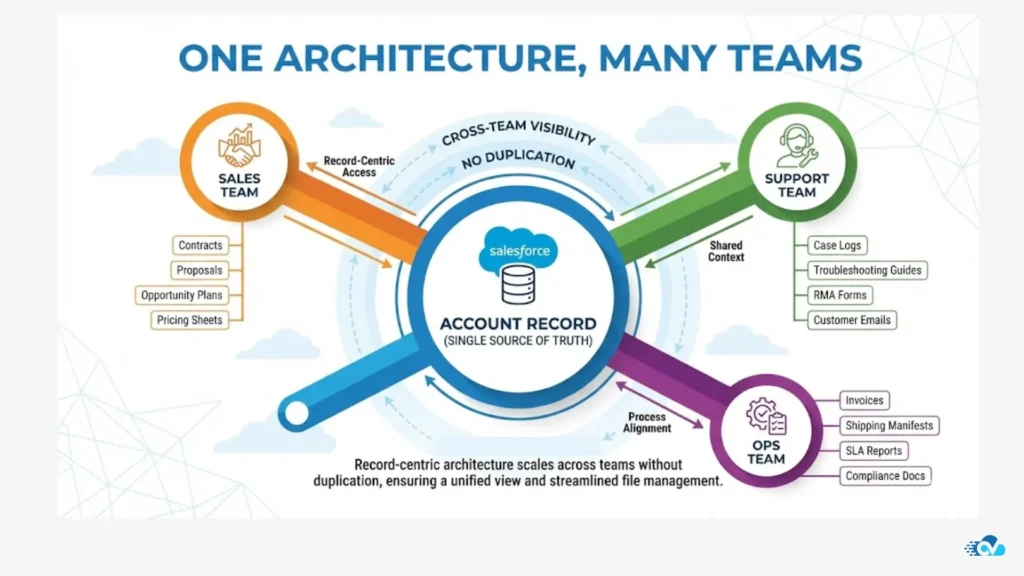
In larger orgs, the hardest challenge is not storage volume. It’s coordination.
Marketing, sales, legal, and support all touch the same accounts, often with overlapping documents.
Leading orgs avoid sprawl by:
- Anchoring shared files at the Account level
- Allowing record-level subfolders for team-specific needs
- Preventing parallel folder trees from forming
This avoids the classic “Which folder is the real one?” problem that plagues growing teams.
What These Orgs Have in Common
Despite different use cases, the orgs that apply file architecture successfully share a few traits:
- They design file behavior upfront
- They let records drive structure
- They automate lifecycle changes
- They remove human discretion where possible
None of this requires extreme customization. It requires clarity.
That’s what makes the approach scalable.
Section 12: Enabling Record-Centric File Architecture in Salesforce
By now, the architecture should feel clear. What’s often missing is the practical bridge between intent and execution.
This is where CV Files fits—not as another integration to manage, but as the layer that operationalizes everything we’ve discussed.
CV Files was built specifically for Salesforce orgs that have outgrown ad-hoc file handling and need structure, automation, and governance to work together—without introducing fragility.
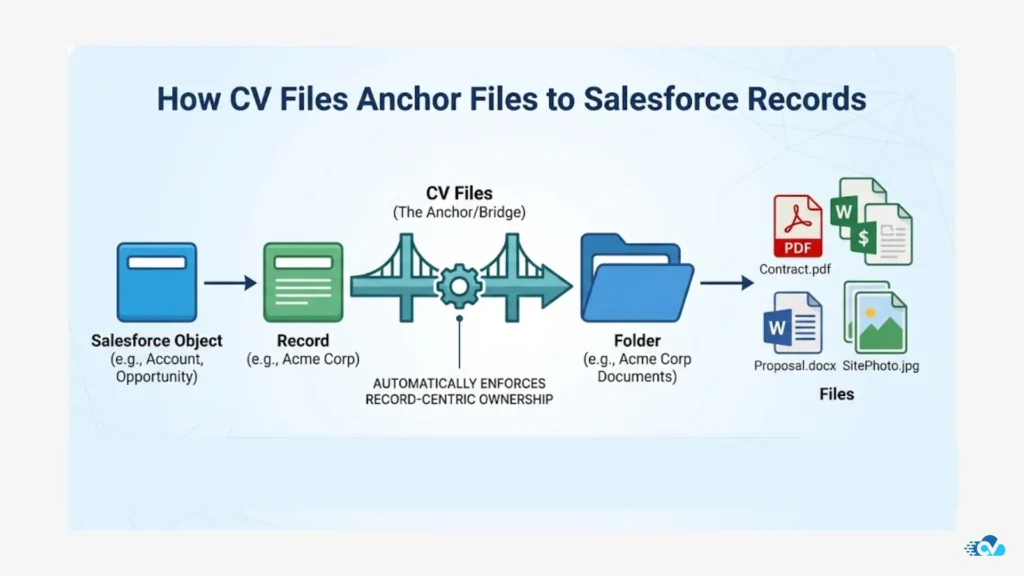
CV Files Is Designed for Record-Centric File Architecture
At its core, CV Files aligns files to Salesforce records by design.
Instead of asking users where a file should go, CV Files uses record context to:
- Create folders automatically based on objects and records
- Enforce consistent naming conventions
- Maintain a one-to-one relationship between records and folders
This means files don’t float. They belong.
Whether your org uses Google Drive or OneDrive, the structure mirrors Salesforce’s data model, not user behavior.
Turning Salesforce Flow into a Reliable File Orchestration Layer
Salesforce Flow becomes exponentially more useful when file actions are deterministic.
CV Files integrates cleanly with Salesforce Flows to support:
- Folder creation on record creation
- Folder renaming when record names change
- File movement or archival on lifecycle events
- Automated uploads routed to the correct folder
The key difference is reliability. Because folders are record-bound, Flow logic doesn’t have to guess. It knows where files should live.
This is what allows file automation to scale without constant exception handling.
Reducing Storage Pressure Without Losing Context
One of the most consistent outcomes we see when teams adopt this approach is predictable storage behavior.
Files are stored externally by default, but remain fully traceable to Salesforce records. That balance delivers:
- Lower Salesforce file storage usage
- Clear ownership and audit trails
- Faster access without duplication
Files feel native to Salesforce workflows, even though they live outside Salesforce.
That’s not accidental. It’s architectural.
Governance Without Extra Process
CV Files doesn’t add governance layers. It enforces governance through structure.
Because:
- Access follows record permissions
- Folder hierarchy is standardized
- Lifecycle actions are automated
Governance becomes systemic. Audits become simpler. Security becomes consistent.
Teams don’t need new policies. The system itself does the right thing.
Why This Approach Stays Invisible to Users
Perhaps the strongest signal that a file strategy is working is that users don’t talk about it.
In orgs using CV Files effectively:
- Sales reps upload files and move on
- Support agents attach evidence without thinking about folders
- Admins stop policing file behavior
The system absorbs complexity so teams can focus on their work.
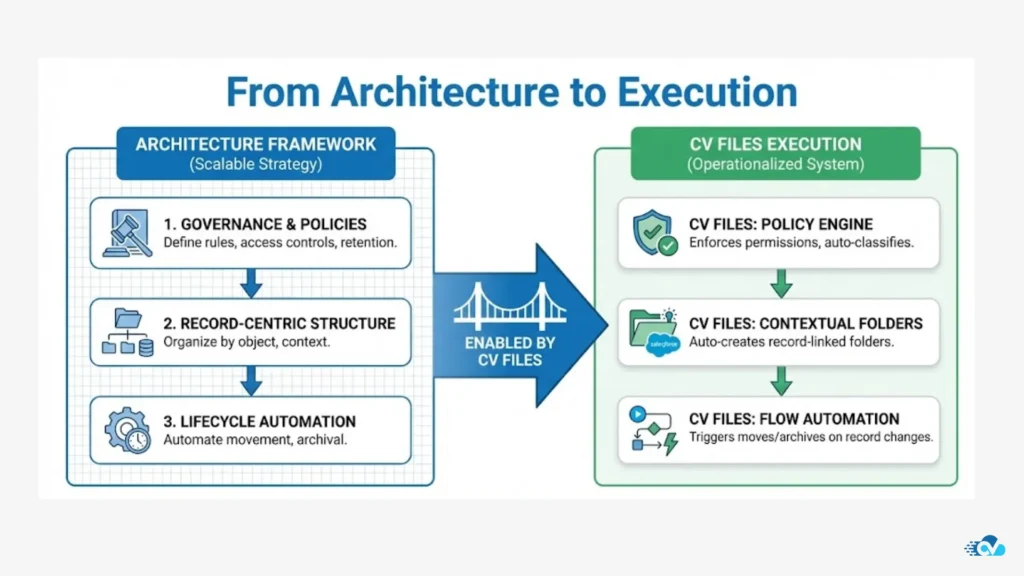
That’s the difference between adding another tool and embedding infrastructure.
Salesforce File Management in 2026
File management inside Salesforce has changed permanently.
What once felt like a secondary concern has become a core architectural decision that impacts cost, automation reliability, governance, and day-to-day usability. As Salesforce orgs grow more data-driven and automation-heavy in 2026, files are no longer passive attachments. They are active system assets.
Across everything we’ve covered, a few truths stand out clearly.
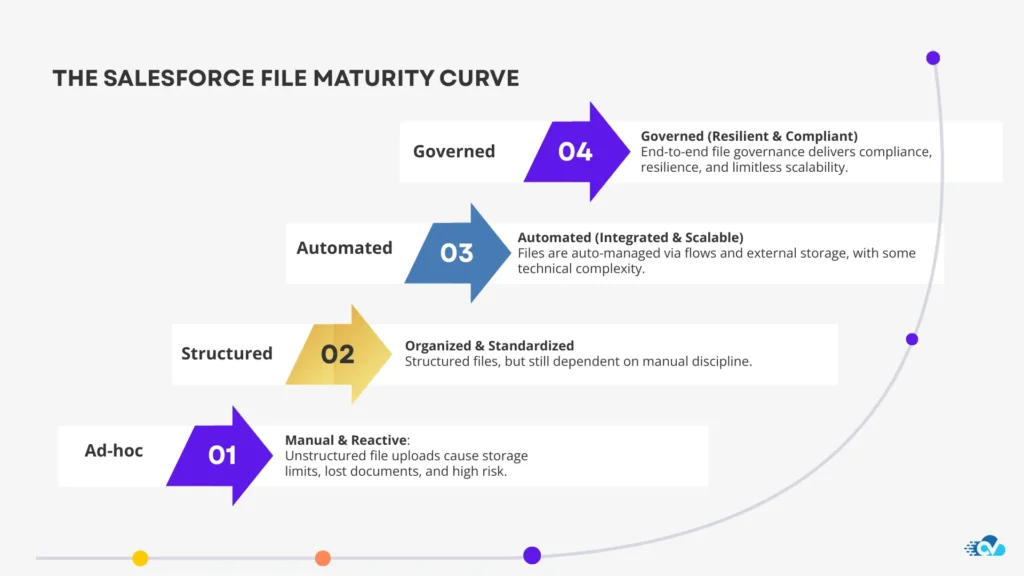
The Core Lessons from Scalable Salesforce Orgs
Teams that manage files successfully at scale don’t rely on habits, training, or cleanup projects. They rely on design.
From our experience working across complex Salesforce environments, the orgs that stay stable over time consistently do the following:
- Treat file management as part of Salesforce architecture, not an afterthought
- Accept that native Salesforce file storage has limits and design around them early
- Use external storage intentionally, with structure and lifecycle rules
- Anchor files to records so ownership and context are never ambiguous
- Automate file behavior using the same logic that governs records
- Enforce governance through the system, not through manual process
When these principles are in place, file chaos doesn’t need to be “fixed” later. It never forms in the first place.
Why This Matters More in 2026 Than Ever Before
Salesforce itself continues to move toward deeper automation, AI-assisted workflows, and connected systems. In that environment, files become part of execution, not just documentation.
Whether it’s AI-driven processes, cross-team collaboration, or compliance readiness, the quality of your file architecture directly affects how resilient your Salesforce org will be.
This is no longer about storage limits alone.
It’s about operational trust.
A Salesforce org where files behave predictably is an org where teams move faster, audits are calmer, and automation actually delivers on its promise.
So What’s the Next Step
If you’re evaluating your current Salesforce setup, a simple litmus test helps:
“If files disappeared tomorrow, would your core processes still make sense?”
If the answer is unclear, file architecture deserves attention now, not later.
Teams that invest early don’t just avoid future problems. They unlock cleaner automation, clearer governance, and lower long-term costs.
That’s the quiet advantage of doing this well.
Learn, Adapt, and Stay Ahead
We regularly share practical insights like this drawn from real Salesforce implementations—what works, what breaks, and how teams adapt as platforms evolve.
If you want more architecture-level guidance on Salesforce scalability, automation, and system design, consider subscribing to our newsletters. We focus on clarity over noise, and strategy over surface-level tips.
And if you’re actively rethinking how files fit into your Salesforce ecosystem, this is exactly the type of problem we help teams solve at CloudVandana—by turning architecture into something that actually works in the real world.Salesforce will keep evolving.
Your file strategy should be ready for that evolution.

He is the founder of CloudVandana and is an 8X Salesforce Certified Professional dedicated to crafting custom Salesforce solutions for businesses worldwide. His deep expertise ensures seamless digital transformation and scalable growth for global enterprises.
cloudvandana.com ->Salesforce Experts and IT Services
Appexchange apps
monday.com apps