
- Why Document Generation Becomes a Bottleneck in monday.com
- What Document Automation Actually Means (and What Most Teams Misunderstand)
- Common Use Cases for Document Automation in monday.com
- How Document Generation Works in monday.com
- What to Look for in a Document Generation App for monday.com
- Limitations of Most monday.com Document Generation Apps
- How Build My Docs Solves These Challenges
- What We’ve Seen Across Real monday.com Teams
- Turning Document Creation Into a Seamless Workflow
- Enjoyed This Article?
How to Automate Document Generation in monday.com
If you’ve been using monday.com for a while, you’ve probably experienced this without even realizing it’s a problem at first.
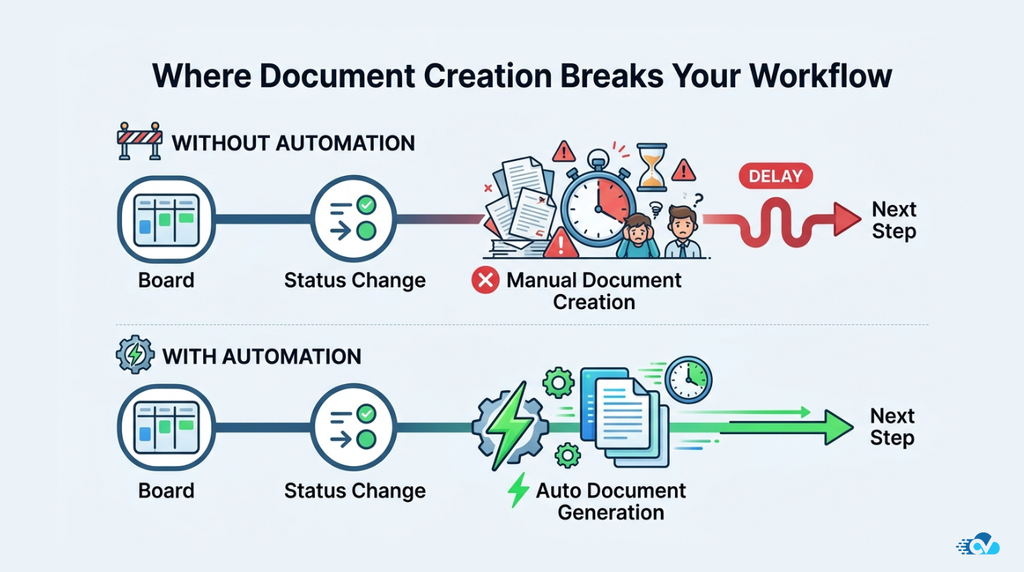
Your workflows are well structured. Your boards are organized. Your team knows exactly where to look for information, and everything feels like it’s running smoothly. But then, at certain points in the process, things slow down in a way that feels oddly manual compared to everything else you’ve automated.
It usually happens when a document is needed.
For example, a deal gets marked as won, and someone now has to sit down and create a contract using the same data that already exists in the board. Or a project is completed, and a report needs to be prepared, which means pulling information from multiple columns and formatting it into something presentable. Even something as routine as sending an invoice often turns into a small task that requires copying, pasting, editing, and double-checking.
None of this is particularly complex, but it breaks the flow of work.
What makes it more frustrating is that the data is already there. monday.com is already doing the heavy lifting when it comes to organizing and tracking information, but when it comes to turning that data into usable documents, most teams still rely on manual effort.
Over time, these small interruptions add up. They slow down processes, introduce inconsistencies, and take up time that could be better spent on more meaningful work.
This is exactly where document automation starts to make a noticeable difference.
Instead of treating document creation as a separate step, it becomes a natural extension of your workflow. The same data that lives in your boards can be used to generate contracts, invoices, reports, or onboarding documents automatically, without requiring your team to start from scratch each time.
In this guide, we’ll take a closer look at how document generation works in monday.com, why it often becomes a bottleneck for growing teams, and what you should look for if you’re planning to automate this part of your workflow effectively.
Why Document Generation Becomes a Bottleneck in monday.com
At first glance, monday.com feels like it should handle everything.
You can track deals, manage projects, assign tasks, automate updates, and bring multiple teams onto a single platform. For most operational workflows, it does a great job of reducing manual effort and keeping things organized.
But when it comes to document generation, there’s a subtle gap that starts to show as teams grow.
The platform is excellent at managing structured data inside boards, but it doesn’t natively transform that data into fully formatted, ready-to-use documents in a way that fits seamlessly into everyday workflows. As a result, teams often end up creating a workaround without even realizing it.
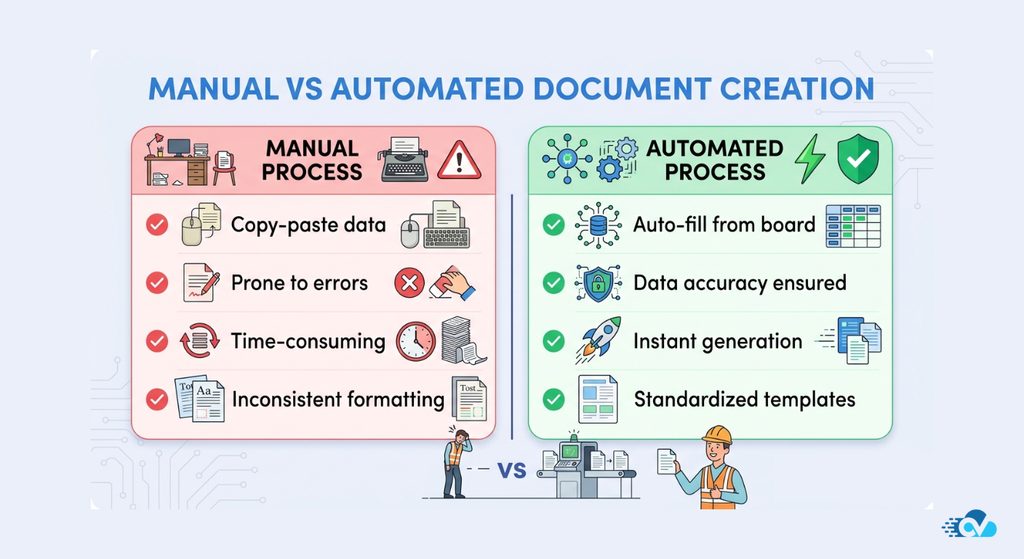
In many cases, this looks like exporting data, copying values into external tools like Word or Google Docs, adjusting formatting manually, and then saving or sharing the final document. It works, but it introduces an extra layer of effort that sits outside the main workflow.
Over time, these workarounds become part of the process.
A sales team might rely on templates stored separately and manually fill in contract details. An operations team might generate reports by pulling information from multiple boards and compiling it into a document. Finance teams often recreate the same invoice structure repeatedly, even though the underlying data already exists in monday.com.
What starts as a small, manageable task slowly becomes a recurring friction point.
There are a few reasons why this happens so consistently.
First, documents are not just raw data. They require structure, formatting, and context. A contract, for example, is more than a list of fields. It needs proper sections, consistent formatting, and sometimes conditional content based on the deal. monday.com stores the data, but it doesn’t inherently define how that data should be presented as a document.
Second, most workflows in monday.com are event-driven, but document creation is often treated as a separate, manual step. Even when automations are in place for status updates or notifications, the moment a document is needed, someone still has to step in and create it.
Third, consistency becomes harder to maintain as teams scale. When multiple people are responsible for creating documents manually, variations start to appear. Formatting changes, fields get missed, and small errors creep in. These inconsistencies may seem minor, but they can impact professionalism and accuracy over time.
And finally, there’s the issue of time.
Individually, generating a document might take only a few minutes. But when you multiply that across dozens or hundreds of documents each week, it becomes a significant operational cost. More importantly, it interrupts momentum. Instead of moving smoothly from one stage of a workflow to the next, teams are forced to pause and complete a task that could be automated.
This is why document generation, despite being overlooked in the beginning, often becomes one of the biggest hidden inefficiencies inside otherwise well-structured monday.com setups.
What Document Automation Actually Means (and What Most Teams Misunderstand)
When teams first hear “document automation,” it often sounds more complex than it actually is.
Some assume it requires heavy technical setup. Others think it’s just about generating PDFs faster. And in many cases, it gets reduced to something as simple as “using templates,” which only solves a small part of the problem.
In reality, document automation is not just about creating documents quickly. It’s about connecting your data, your workflows, and your outputs in a way that removes manual effort entirely.
At a basic level, document automation involves three key elements working together.
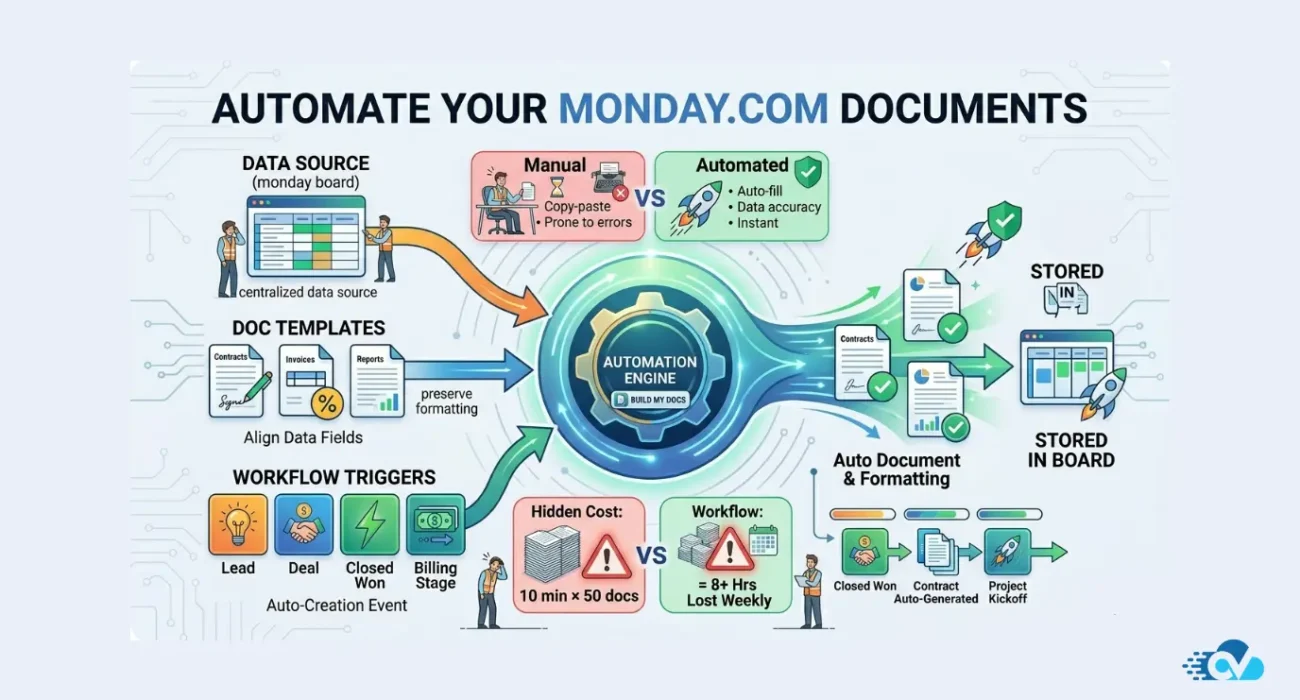
The first is your data source, which in this case is your monday.com board. This is where all your structured information lives, whether it’s deal values, client details, project timelines, or billing information.
The second is a document template, which defines how that data should be presented. This could be a contract layout, an invoice format, a report structure, or any other type of document your team regularly creates. The template acts as a blueprint, mapping specific fields from your board into the right places within the document.
The third is a trigger, which determines when the document should be generated. This could be something like a status change, a button click, or a specific update within your workflow. Instead of someone deciding when to create a document, the system does it automatically based on predefined conditions.
When these three elements are connected properly, the process becomes seamless.
For example, imagine a sales pipeline where a deal moves to “Closed Won.” Instead of notifying someone to create a contract, the system automatically generates it using the deal data, fills in all relevant fields, formats it correctly, and makes it ready to send. No additional steps are required.
This is very different from simply using templates.
Templates still rely on manual input. Someone has to open the document, copy the data, paste it into the right places, and make sure everything is correct. Automation removes that dependency entirely.
Another common misunderstanding is that document automation is only useful for high-volume operations. While it’s true that the impact becomes more visible at scale, even smaller teams benefit from the consistency and time savings it brings. In fact, the earlier this is implemented, the easier it becomes to maintain structured, error-free workflows as the team grows.
It’s also important to understand that good document automation is not rigid. It should be flexible enough to handle variations in your data. For instance, certain sections of a contract might only appear under specific conditions, or an invoice might need to adapt based on different pricing structures. A well-designed automation setup accounts for these scenarios without requiring manual adjustments.
Once you start looking at document creation through this lens, it stops being a repetitive task and becomes part of your workflow logic.
And that shift is what makes everything else easier.
Common Use Cases for Document Automation in monday.com
One of the easiest ways to understand the value of document automation is to look at where it shows up in everyday workflows.
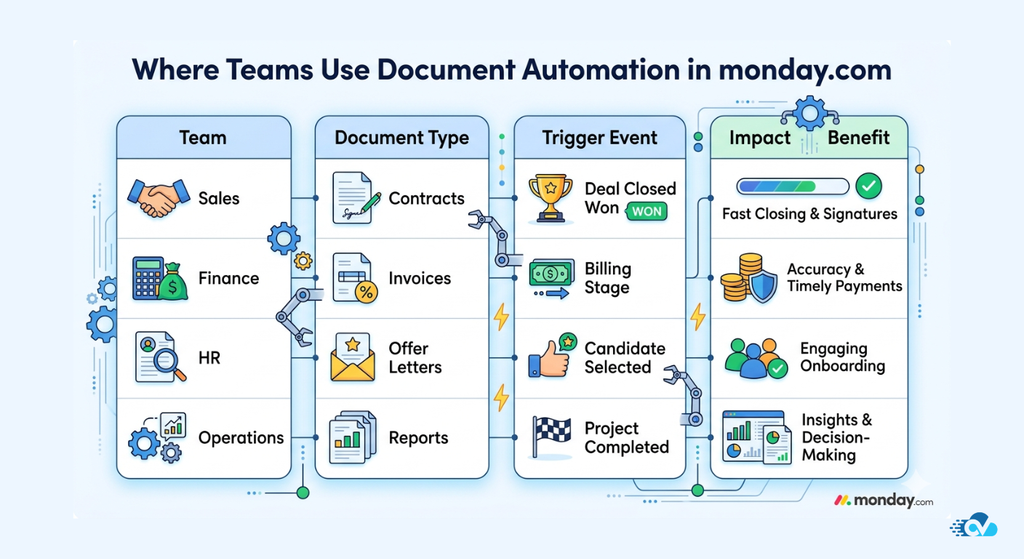
Almost every team that uses monday.com, regardless of industry, ends up creating some form of recurring document. The format may change, but the pattern is usually the same: structured data exists inside a board, and that data needs to be turned into something presentable and shareable.
Let’s look at some of the most common scenarios where document automation makes an immediate impact.
Contracts and Agreements
For sales and legal teams, contracts are one of the most frequent and time-sensitive documents.
Typically, when a deal reaches its final stage, someone needs to prepare a contract using details like client name, pricing, terms, timelines, and deliverables. Without automation, this process often involves copying information from the board into a pre-built document template and then reviewing it manually.
With document automation, this entire step can be triggered automatically. As soon as a deal is marked as closed, a contract can be generated with all the relevant details already filled in, formatted correctly, and ready to send. This not only speeds up the process but also reduces the risk of missing or incorrect information.
Invoices and Billing Documents
Finance teams often deal with repetitive document creation, especially when it comes to invoices.
Even when billing data is tracked inside monday.com, invoices are frequently created outside the platform. This creates a disconnect between the source of truth and the final document, increasing the chances of inconsistencies.
Automating invoice generation allows teams to pull data directly from the board, including line items, pricing, and client details, and convert it into a structured invoice instantly. This ensures accuracy while also saving time on routine administrative work.
Project Reports and Status Updates
Project and operations teams regularly need to share updates with stakeholders, whether internally or externally.
These reports often require summarizing progress, timelines, completed tasks, and upcoming milestones. When done manually, this can involve gathering information from multiple boards, organizing it, and formatting it into a readable document.
With automation, reports can be generated dynamically using real-time data from the board. This means that instead of rebuilding reports from scratch, teams can produce consistent, up-to-date documents whenever needed, without additional effort.
Client Onboarding Documents
For agencies and service-based businesses, onboarding new clients involves a series of documents such as welcome kits, requirement forms, or project briefs.
These documents typically follow a standard structure but need to include client-specific information. Manually creating them for every new client can be time-consuming and repetitive.
By automating this process, onboarding documents can be generated as soon as a new client is added to the system, ensuring a smooth and consistent start to every engagement.
HR and Internal Documentation
HR teams also benefit significantly from document automation, especially when handling employee onboarding, offer letters, and internal records.
These documents often require pulling data from structured fields such as employee details, roles, compensation, and start dates. Automating their creation ensures consistency across all documents while reducing manual workload for HR teams.
Proposals and Quotations
Sales teams frequently create proposals and quotations that need to reflect accurate pricing, scope, and timelines.
Since this information already exists within monday.com boards, automating proposal generation eliminates the need to recreate documents manually. It also allows teams to respond faster to opportunities, which can directly impact conversion rates.
Across all these use cases, the pattern remains the same.
The data already exists. The document structure is usually predefined. The only missing piece is the connection between the two.
Once that connection is established, document creation becomes a seamless part of the workflow rather than a separate task.
How Document Generation Works in monday.com
Once you understand the use cases, the next question naturally becomes: how does this actually work inside monday.com?
The good news is, it’s not complicated. In fact, the entire process can be broken down into a simple flow that mirrors how your team already works.
At its core, document generation in monday.com is about turning structured board data into formatted output, using a combination of templates and triggers.
Let’s walk through this step by step.
1. Your Board Acts as the Data Source
Everything begins with your monday.com board.
This is where your team is already storing information, whether it’s deal details, client data, project updates, or billing information. Each column represents a specific data point, such as name, status, numbers, dates, or text fields.
Instead of thinking of your board as just a tracking tool, it helps to think of it as a live database that holds all the information your documents need.
For example, a sales board might contain:
- Client name
- Deal value
- Contract start date
- Payment terms
All of this is exactly what you would normally type into a contract manually.
2. A Template Defines the Document Structure
The next piece is the document template.
This is where you define how your final document should look. It could be a contract, an invoice, a report, or any other type of document your team uses regularly.
Inside the template, placeholders are mapped to your board data. For instance, instead of typing a client name manually, the template pulls that value directly from the relevant column in your board.
This ensures that every document follows a consistent format while still being personalized based on the data.
3. A Trigger Decides When the Document Is Created
The real power of automation comes from the trigger.
Rather than relying on someone to remember when to create a document, you define a condition that automatically initiates the process.
This could be:
- A status change (for example, when a deal is marked as “Closed Won”)
- A button click
- A date-based condition
- Or any other workflow event
Once the trigger is activated, the system knows it’s time to generate the document.
4. The Document Is Generated Automatically
When the trigger fires, the system pulls data from the board, applies it to the template, and generates the final document.
At this point, everything is already filled in and formatted. The document is no longer a draft that needs editing. It’s ready to be reviewed, shared, or sent immediately.
Depending on the setup, the output can be in different formats such as PDF or DOCX, and it can be stored, attached, or distributed as part of your workflow.
5. The Workflow Continues Without Interruption
The most important part of this process is what doesn’t happen.
No one has to pause their work to create a document.
No one has to copy data from one place to another.
No one has to double-check whether everything was entered correctly.
The workflow simply continues, with the document generation happening in the background as a natural step in the process.
When you look at it this way, document generation stops being a separate task and becomes part of your system design.
And once that shift happens, it becomes much easier to see where the real opportunity lies: not just in creating documents faster, but in removing the need to create them manually at all.
What to Look for in a Document Generation App for monday.com
Once teams realize that document creation can be automated, the next step is usually exploring apps or tools that can make it happen inside monday.com.
At this stage, it’s easy to get overwhelmed.
Many apps promise document generation, and on the surface, they often seem similar. Most of them mention templates, PDFs, and automation in some form. But when you look a little closer, the differences start to matter, especially once you try to fit the tool into your actual workflow.
Instead of focusing only on features, it helps to think about how well a solution aligns with the way your team already works.
Here are a few things worth paying close attention to.
Flexibility in Templates
A good document generation tool should allow you to create templates that match your real-world documents, not force you into a rigid structure.
In practice, this means being able to control formatting, layout, and content placement without limitations. Whether it’s a detailed contract or a simple invoice, your templates should feel like the documents you would normally create manually.
It also helps if the tool supports dynamic fields seamlessly, so you can map your board data without complicated setup.
Support for Dynamic and Conditional Content
Not every document follows the exact same format every time.
In many cases, certain sections only appear under specific conditions. For example, a contract might include different clauses depending on the deal type, or a proposal might adjust based on pricing tiers.
A strong document automation solution should be able to handle these variations without requiring multiple versions of the same template. Conditional logic makes it possible to keep templates clean while still adapting to different scenarios.
Automation That Fits Your Workflow
This is where many tools fall short.
Some apps allow document generation, but only through manual triggers. While this is better than starting from scratch, it still interrupts the workflow.
Ideally, document creation should be tied directly to events inside your board. When something changes, such as a status update or a new item being created, the document should be generated automatically without requiring additional steps.
The closer the automation is to your actual workflow, the more valuable it becomes.
Multiple Output Formats
Different teams need different types of documents.
Sometimes a PDF is enough. In other cases, you may need an editable document format like DOCX. Having the flexibility to choose the output format ensures that the tool can support multiple use cases without requiring additional tools.
Ease of Setup and Use
Even the most powerful tool loses its value if it’s difficult to set up or maintain.
A good solution should make it easy to connect your board data to templates, define triggers, and start generating documents quickly. The goal is to reduce complexity, not add another layer of it.
This is especially important for teams that want to scale document automation across multiple workflows without relying heavily on technical support.
Scalability Across Teams and Workflows
What works for one use case should be adaptable to others.
If you start with automating contracts, you should be able to extend the same setup to invoices, reports, or onboarding documents without rebuilding everything from scratch. A scalable solution allows you to standardize document processes across your organization.
When you evaluate document generation apps with these points in mind, the differences become much clearer.
It’s no longer just about whether a tool can generate a document, but whether it can do so in a way that truly integrates into your workflow and removes manual effort at scale.
Limitations of Most monday.com Document Generation Apps
By now, it’s clear that document automation can solve a real operational problem. And to be fair, many apps in the monday.com marketplace do attempt to address this.
But once teams start using these tools in real workflows, certain limitations begin to surface. Not immediately, but over time, as use cases become more complex and expectations grow.
Understanding these gaps is important, because it helps explain why some implementations feel incomplete, even when the core functionality is there.
Templates That Don’t Fully Reflect Real Documents
Many tools support templates, but in a limited way.
At first, everything seems fine. You can map fields, generate a basic document, and automate the process to some extent. But as soon as your document requires more structured formatting or a more polished layout, things start to feel restrictive.
Teams often find themselves adjusting documents manually after generation, which defeats the purpose of automation.
In reality, business documents are rarely “simple.” Contracts, proposals, and reports often require precise formatting, sections, and styling. When a tool can’t fully support that, automation becomes only partially useful.
Limited Handling of Conditional Logic
This is one of the most common friction points.
Most workflows are not one-size-fits-all. A contract might include different clauses depending on the service type. An invoice might vary based on pricing models. A report might display different sections depending on project status.
However, many document generation tools struggle with conditional content. Instead of dynamically adapting, they require multiple templates for each variation, which quickly becomes difficult to manage.
As complexity increases, the system becomes harder to maintain rather than easier.
Manual Steps Still Exist in “Automated” Workflows
Some apps claim automation, but still rely heavily on manual triggers.
For example, a user might need to click a button every time a document needs to be generated. While this is faster than creating a document from scratch, it still introduces a pause in the workflow.
True automation should remove the need for intervention entirely. If a document still depends on someone remembering to generate it, the workflow isn’t fully optimized.
Disconnect Between Document Creation and File Management
Another overlooked issue is what happens after the document is generated.
In many cases, documents are created but not stored or organized effectively. Teams end up downloading files, uploading them elsewhere, or manually attaching them back to items.
This creates fragmentation, where documents exist outside the system that generated them, making it harder to track, access, and manage files over time.
Scalability Challenges
A solution that works for one workflow doesn’t always scale well across the organization.
As teams try to expand document automation to multiple use cases, they often run into limitations around template management, automation rules, or performance. What started as a simple setup becomes increasingly complex to maintain.
This is especially noticeable in growing teams where multiple departments rely on document generation simultaneously.
User Experience and Setup Complexity
Finally, there’s the learning curve.
Some tools require a significant amount of setup before they become usable. Mapping fields, configuring templates, and defining triggers can feel unintuitive, especially for non-technical users.
If a tool is difficult to adopt, teams are less likely to use it consistently, which limits its overall impact.
None of these limitations mean that document generation apps aren’t useful. They absolutely are.
But they highlight an important point: not all solutions are built to handle real-world workflows at scale.
And this is exactly where the difference between “basic document generation” and true workflow-integrated document automation becomes clear.
How Build My Docs Solves These Challenges
If you look at all the limitations we just discussed, they point to one core issue.
Most tools treat document generation as an add-on feature.
But in reality, document creation is not a side task. It’s a critical part of many workflows, whether it’s closing a deal, onboarding a client, or completing a project. And when something is that central to operations, it needs to be deeply integrated, not loosely attached.
This is exactly the approach behind Build My Docs.
Instead of focusing only on generating documents, it’s designed to make document creation feel like a natural extension of how your monday.com workflows already function.
Built for Real-World Document Complexity
One of the biggest gaps in most tools is their inability to handle the kind of documents teams actually use every day.
Build My Docs addresses this by allowing teams to create templates that closely mirror real business documents. Whether it’s a detailed contract, a structured report, or a multi-section proposal, the focus is on preserving formatting, layout, and readability without compromise.
This means the output isn’t something that needs fixing after generation. It’s ready to use.
Dynamic Content That Adapts to Your Workflow
Instead of forcing teams to create multiple versions of the same document, Build My Docs supports dynamic content that adjusts based on your data.
This makes it possible to handle variations within a single template.
For example, different clauses in a contract, different pricing structures in a proposal, or different sections in a report can all be controlled through logic tied to your monday.com board. The document adapts automatically, without requiring manual intervention.
Automation That Actually Feels Automatic
A key difference lies in how automation is handled.
With Build My Docs, document generation can be tied directly to workflow triggers. When a status changes, when an item is created, or when a specific condition is met, the document can be generated without anyone needing to step in.
This removes the “don’t forget to create the document” step entirely.
And more importantly, it keeps your workflow moving without interruption.
Seamless File Handling Inside monday.com
Generating a document is only part of the process. What happens next matters just as much.
Build My Docs ensures that generated documents remain connected to your workflow. Instead of downloading and re-uploading files, documents can be stored, accessed, and managed directly within monday.com.
This keeps everything in one place, making it easier for teams to track, share, and reference documents whenever needed.
Designed to Scale Across Use Cases
What starts as one use case can quickly expand.
Today it might be contracts. Tomorrow it could be invoices, onboarding documents, or reports. Build My Docs is designed to support this kind of growth without requiring teams to rebuild their setup each time.
Templates, automations, and workflows can be reused and adapted, making it easier to standardize document processes across the organization.
Simple Enough to Adopt, Powerful Enough to Grow
One of the biggest barriers to automation is complexity.
Build My Docs strikes a balance by making it easy to get started while still offering the flexibility needed for more advanced use cases. Teams don’t need to overhaul their workflows or rely heavily on technical resources to begin seeing value.
It fits into how teams already work, rather than forcing them to change everything.
At this point, the difference becomes clear.
This isn’t just about generating documents faster. It’s about removing document creation as a manual step altogether, so your workflows can operate the way they were meant to, smoothly, consistently, and without unnecessary interruptions.
What We’ve Seen Across Real monday.com Teams
Over time, working closely with teams using monday.com, a pattern starts to become very clear.
It doesn’t matter whether the team is in sales, operations, HR, or finance. The workflows may look different on the surface, but when it comes to document creation, the challenges tend to repeat themselves in very similar ways.
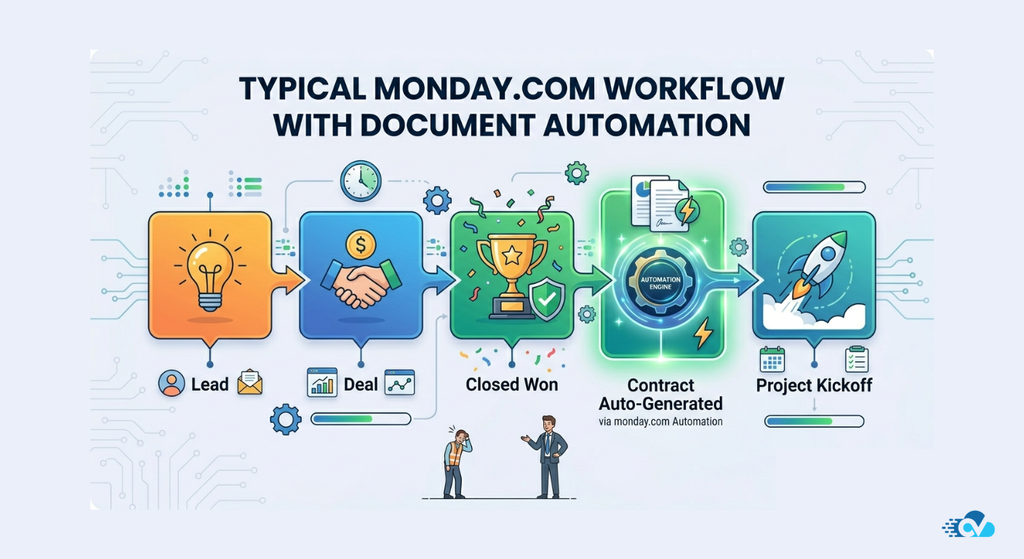
And interestingly, most teams don’t even recognize it as a problem in the beginning.
“Everything is automated… except this one step”
This is probably the most common thing we hear.
Teams invest time in building structured boards, setting up automations, and creating smooth workflows. Status changes trigger notifications, tasks move automatically, and ownership is clearly defined.
But then, at a critical point in the process, everything pauses.
Someone has to create a document.
It could be a contract after a deal closes, a report at the end of a project, or an invoice before billing. And suddenly, the workflow shifts from automated to manual.
Not because the data isn’t available, but because there’s no direct way to turn that data into a document within the flow of work.
“We already have templates… but we still copy-paste”
Another pattern we’ve seen across multiple teams is the reliance on templates stored outside monday.com.
These templates are usually well-designed and standardized, which is great. But the process still depends on someone manually filling them out.
So even though the structure is predefined, the effort remains repetitive.
Teams end up copying the same fields over and over again:
- Client names
- Pricing details
- Dates
- Project scope
Over time, this becomes second nature. But it’s still time-consuming, and more importantly, it introduces room for small errors that are easy to overlook.
“It only takes a few minutes… but it adds up”
Individually, document creation doesn’t feel like a major issue.
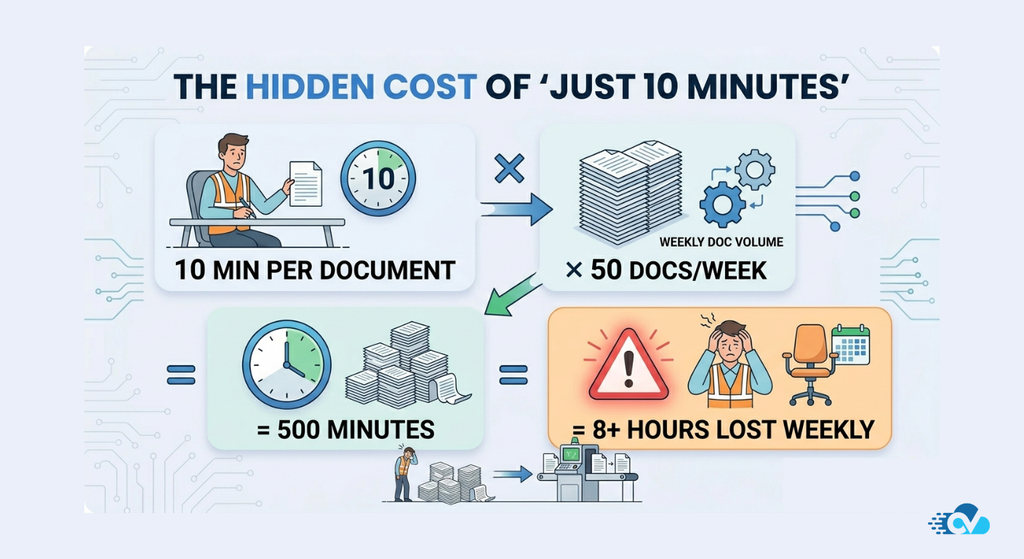
Most teams estimate it takes somewhere between 5 to 15 minutes per document, depending on complexity. But when you look at it across the entire team, the numbers tell a different story.
Dozens of documents each week quickly turn into hours of repetitive work.
And what’s more subtle is the interruption it causes.
Instead of moving smoothly from one stage of a workflow to the next, team members have to stop, switch context, and complete a task that doesn’t really require decision-making, just execution.
“We’ve had small errors… nothing major, but still”
This is where things get a bit more sensitive.
Even in well-managed teams, manual processes tend to introduce inconsistencies over time. A missing field, an outdated value, a formatting issue, or a clause that wasn’t updated.
These aren’t catastrophic errors, but they do impact professionalism and sometimes require follow-ups or corrections.
And since documents often represent the final output shared with clients or stakeholders, even small mistakes become more noticeable.
“Scaling this process feels messy”
As teams grow, these challenges become harder to manage.
What worked for a small team starts to feel inefficient at scale. More people are involved, more documents are created, and maintaining consistency becomes increasingly difficult.
We’ve seen teams try to solve this by creating more templates, more guidelines, or more checks, but that often adds complexity rather than removing it.
The underlying issue remains the same: document creation is still a manual step.
What This All Comes Down To
Across all these conversations and implementations, one insight stands out clearly.
The problem isn’t that teams don’t have the right data.
And it’s not that they don’t have templates.
It’s that the connection between data and documents is missing inside the workflow.
Once that connection is established, everything changes.
Document creation stops being a separate task and becomes something that simply happens as part of the process.
Turning Document Creation Into a Seamless Workflow
If there’s one thing that becomes clear from everything we’ve discussed, it’s this:
Document creation isn’t the problem.
The way it fits (or doesn’t fit) into your workflow is.
Most teams using monday.com already have the foundation in place. Their data is structured, their processes are defined, and their workflows are moving in the right direction. But document generation often sits just outside that system, quietly introducing friction at the exact moments where speed and accuracy matter most.
And because it’s usually a small task, it gets overlooked.
Until it starts adding up.
What Actually Changes With Document Automation
When document generation becomes part of your workflow, a few important shifts happen.
- Your team no longer needs to pause work to create documents manually
- Data flows directly from your boards into structured, ready-to-use documents
- Consistency improves because every document follows the same template logic
- Errors are reduced since information is pulled directly from the source
- Processes move faster, especially at critical stages like closing deals or onboarding clients
But beyond efficiency, there’s something more subtle.
Work starts to feel smoother.
Instead of switching between tools and tasks, your team can stay focused on the process itself, while document creation happens quietly in the background.
A Simple Way to Think About It
A helpful way to look at this is:
monday.com organizes your work.
Document automation completes it.
Without document automation, workflows often feel like they stop just short of the finish line. With it, the final output becomes part of the same system.
This is exactly where Build My Docs fits in.
It’s designed for teams that already rely on monday.com and want to eliminate the manual effort involved in creating contracts, invoices, reports, and other recurring documents.
Instead of adding another tool to your stack, it extends what you’re already doing.
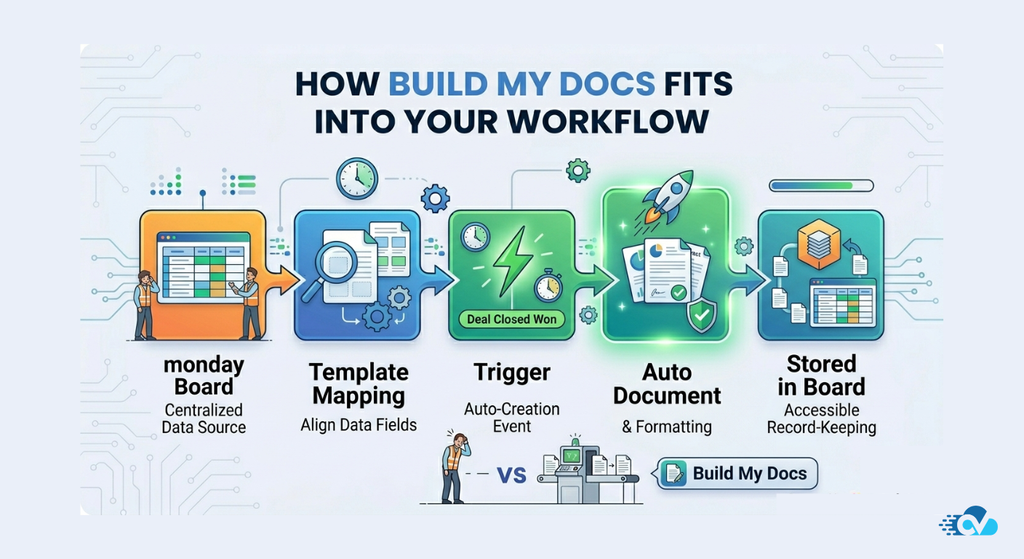
Your board remains your source of truth.
Your workflow remains unchanged.
But your documents are generated automatically, accurately, and consistently.
If You’re Thinking About Automating This…
You don’t need to overhaul everything to get started.
In fact, most teams begin with just one use case.
A contract.
An invoice.
A report.
Once that’s automated, the value becomes obvious, and expanding to other workflows becomes much easier.
Automation isn’t just about doing things faster.
It’s about removing the parts of your workflow that don’t need to be manual in the first place.
And document creation is one of the clearest opportunities to make that shift.
Take the First Step Toward Smarter Document Workflows
If your team is still creating documents manually alongside your monday.com workflows, it might be time to rethink that process.
Explore how Build My Docs can help you automate document generation directly from your boards and streamline your workflows end-to-end.
Enjoyed This Article?
If this guide helped you better understand file management in monday.com, you might enjoy The CloudVandana Weekly.
We share practical tips, platform updates, and workflow ideas to help teams get more out of monday.com.
Consider subscribing to stay updated with new insights and resources.

He is the founder of CloudVandana and is an 8X Salesforce Certified Professional dedicated to crafting custom Salesforce solutions for businesses worldwide. His deep expertise ensures seamless digital transformation and scalable growth for global enterprises.
cloudvandana.com ->Salesforce Experts and IT Services
Appexchange apps
monday.com apps